

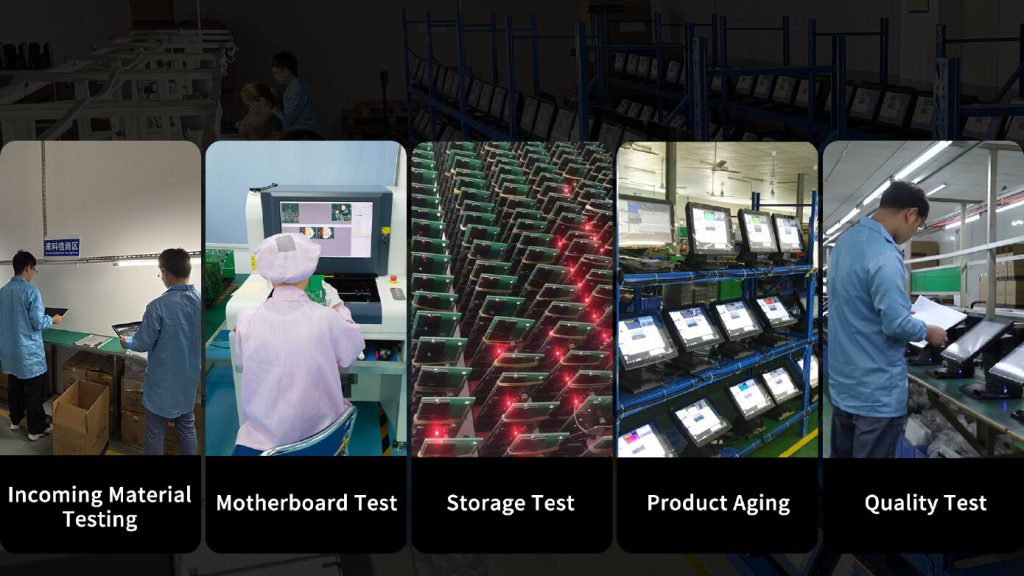
Selecting a point-of-sale system is a significant technology decision for businesses that depend on efficient transactions and reliable daily operations. The manufacturer behind the hardware can influence product quality, compatibility, support, upgrade options, and the overall lifespan of the system.
When comparing a POS System Manufacturer, businesses should evaluate more than the appearance or initial price of the equipment. A careful comparison of hardware capabilities, integration requirements, service options, and long-term value can help identify a solution that fits both current operations and future needs.
Product Range and Hardware Options
Start by reviewing the manufacturer’s range of POS equipment. Different businesses require different combinations of terminals and peripherals, so the available selection should match your operational requirements.
Depending on the business, relevant products may include touchscreen terminals, barcode scanners, receipt printers, cash drawers, customer displays, payment devices, and mobile POS equipment.
A diverse range can also make future expansion easier if additional devices are needed.
Hardware Quality and Durability
POS equipment is often used continuously, making reliability an important consideration. Hardware should be suitable for the environment in which it will operate.
Examine construction quality, processing capabilities, display specifications, connectivity, and expected operating conditions. A busy restaurant may require equipment capable of handling intensive daily use, while a retail store may prioritize dependable performance at fixed checkout stations.
Compatibility With POS Software
Hardware must integrate properly with the software that runs the business. Compatibility issues can cause configuration difficulties, communication errors, or additional expenses.
Before choosing a manufacturer, confirm supported operating systems, drivers, software platforms, and peripheral connections. If you already have a POS system, make compatibility with existing equipment a priority.
Payment Integration
Payment processing is one of the most important functions of a modern POS environment. Businesses may need to support card transactions, contactless payments, mobile wallets, or other payment methods.
Check whether the manufacturer’s payment hardware integrates with your chosen payment platform. The device should also fit naturally into the checkout or ordering workflow.
Scalability and Upgrade Options
Business requirements can change over time. A company may add checkout stations, open additional locations, introduce mobile ordering, or expand its product and service range.
A manufacturer offering scalable hardware can make these changes easier to manage. Look for equipment that can be expanded or replaced with compatible models as requirements evolve.
Ease of Use
Employees interact with POS hardware throughout the working day, so usability should not be overlooked. Complicated equipment can increase training time and slow down routine transactions.
Consider touchscreen responsiveness, screen size, device placement, scanner performance, printer speed, and the overall design of the workstation. Hardware should support the employee’s workflow rather than create unnecessary steps.
Connectivity and Integration
POS equipment may rely on Ethernet, Wi-Fi, Bluetooth, USB, or other connection methods. The appropriate configuration depends on the business environment and the devices involved.
Retail stores with fixed checkout counters may have different connectivity needs from restaurants using handheld terminals. Confirm that the manufacturer’s hardware supports the connection options required for your setup.
Technical Support
Even reliable equipment may eventually require troubleshooting. The manufacturer’s or supplier’s support services can therefore have a direct effect on how quickly problems are resolved.
Before making a decision, investigate available support channels, response procedures, documentation, repair services, and replacement options. Clear support arrangements can be especially valuable for businesses that cannot afford prolonged POS downtime.
Warranty Coverage
Warranty terms can vary considerably between manufacturers. Review the length of coverage and understand what happens when a device develops a covered fault.
Pay attention to:
- Covered components
- Warranty duration
- Exclusions
- Repair procedures
- Replacement policies
- Shipping or service requirements
Understanding these terms in advance helps businesses plan for potential equipment failures.
Total Cost of Ownership
Initial price should be considered alongside the costs associated with operating and maintaining the system. A cheaper terminal may not provide better value if it requires frequent repairs or has limited upgrade options.
Consider hardware costs, installation, accessories, maintenance, support, replacements, and potential upgrades. Evaluating the total cost over the expected lifespan provides a clearer picture of long-term value.
Manufacturer Reputation
Researching a manufacturer’s reputation can provide useful context when comparing options. Look for information about product reliability, customer experiences, support quality, and how the company handles warranty or service issues.
Independent reviews can be helpful, but they should be considered together with technical specifications and your own business requirements.
Industry Experience
A manufacturer’s experience with your industry can also be relevant. Retail businesses may need hardware optimized for scanning and checkout, while restaurants may require mobile ordering equipment and kitchen-facing devices.
Manufacturers familiar with these different workflows may offer hardware options that better align with specific operational requirements.
Future Technology Support
POS technology continues to develop. Payment methods, connectivity standards, cloud-based software, and mobile workflows can all change over time.
When comparing manufacturers, consider whether their hardware can accommodate modern technologies and software updates. Choosing flexible equipment can reduce the likelihood of an early replacement when business technology evolves.
Create a Comparison Checklist
A structured checklist can make the selection process easier. Compare manufacturers using the same criteria rather than focusing on a single feature.
Key factors include:
- Product range
- Hardware durability
- Software compatibility
- Payment integration
- Scalability
- Connectivity
- Technical support
- Warranty coverage
- Total cost of ownership
- Reputation and industry experience
This approach provides a balanced view and makes it easier to identify the option that best fits your business.
Final Thoughts
Comparing POS system manufacturers requires a long-term perspective. The most suitable option is not necessarily the one with the lowest upfront price or the largest product catalog.
Businesses should consider hardware quality, compatibility, payment integration, scalability, usability, connectivity, support, warranty coverage, and total ownership costs. Evaluating these factors together can help businesses select POS technology that remains reliable and practical as their operations grow.
About Post Author




More Stories
The Role of Xprinter Thermal Printers in Improving Retail Checkout Efficiency
How to Identify High-Quality Tissue Culture Plants Before Purchasing
Understanding Acoustic Panel Specifications Before Placing a Bulk Order