

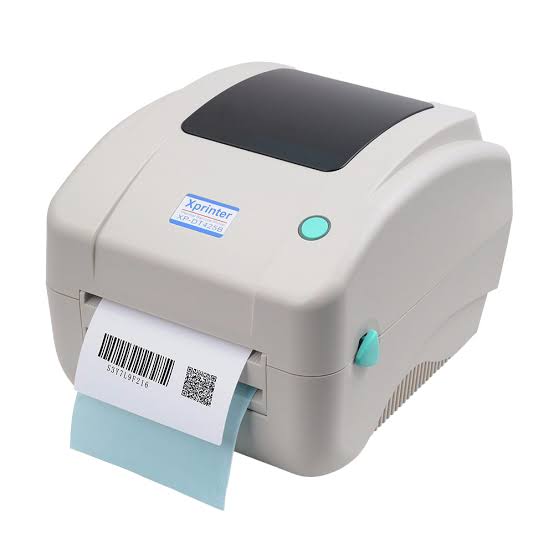
Retail checkout efficiency plays an important role in customer satisfaction and daily store performance. Long queues, slow receipt generation, printing errors, and equipment interruptions can create delays, especially during busy shopping periods. Retailers therefore need dependable point-of-sale (POS) equipment that supports fast transactions and keeps checkout operations organized. Thermal printing technology has become a practical choice because it produces receipts quickly without requiring traditional ink cartridges or toner.
From supermarkets and convenience stores to clothing shops and specialty retailers, receipt printing is a routine part of completing purchases. Using an Xprinter Thermal Printer as part of a suitable POS setup can help businesses manage receipt printing and support smoother transaction workflows. When the printer is correctly configured and matched to the store’s requirements, it can contribute to a more organized checkout experience for both employees and customers.
Understanding the Importance of Checkout Efficiency
Checkout is one of the final stages of the retail shopping experience. Even when customers find products easily and receive helpful service, delays at the payment counter can affect their overall impression of a store.
Efficient checkout operations help retailers:
- Reduce customer waiting times.
- Process more transactions during busy periods.
- Improve employee productivity.
- Maintain accurate transaction records.
- Provide customers with clear receipts.
- Keep payment counters organized.
A well-designed POS system brings together payment processing, sales software, barcode scanning, and receipt printing. Each component has a specific role, and reliable communication between these devices is essential for smooth operations.
1. Faster Receipt Printing Supports Shorter Checkout Times
One of the main advantages of thermal receipt printers is their ability to produce printed information quickly. Thermal technology uses heat-sensitive paper to create text and graphics, eliminating the need for ink cartridges in direct thermal printing.
At a retail checkout counter, this allows employees to complete the printing stage without waiting for a conventional ink-based printer to prepare a page.
Faster receipt generation can be particularly useful in:
- Supermarkets with multiple checkout counters.
- Convenience stores handling frequent small purchases.
- Clothing retailers processing sales throughout the day.
- Pharmacies printing transaction summaries.
- Department stores managing high customer volumes.
The actual printing speed depends on the selected printer model, receipt content, paper quality, and configuration. Retailers should compare these specifications with their expected transaction volume.
2. Reduced Consumable Replacement Interruptions
Traditional printers may require ink or toner replacement as part of regular operation. Direct thermal receipt printers use heat-sensitive paper instead, which simplifies consumable management for many retail applications.
Employees do not need to monitor ink or toner levels when using direct thermal printing. This can reduce certain maintenance tasks and help checkout counters remain operational.
However, retailers still need to maintain an adequate supply of compatible thermal paper rolls. Monitoring paper inventory and replacing rolls before they run out can prevent avoidable interruptions.
3. Better Integration with Point-of-Sale Systems
Modern retail checkout counters rely on POS software to manage sales, calculate totals, process payments, and generate transaction records. Receipt printers must communicate effectively with these systems to complete the printing process.
Depending on the model, thermal printers may support different connection options, such as USB, Ethernet, serial, or wireless interfaces. Retailers should confirm which interfaces are available before selecting equipment.
Good POS integration helps employees complete a transaction through a consistent workflow:
- Products are scanned or entered into the POS system.
- The software calculates the purchase total.
- The customer completes payment.
- The POS system sends receipt information to the printer.
- The printer produces the transaction receipt.
When the printer, software, and payment equipment are configured correctly, employees can complete these steps with fewer manual actions.
4. Clear Receipts Improve Transaction Accuracy
A receipt provides customers with a record of their purchase and helps retailers document completed transactions. It commonly includes product descriptions, quantities, prices, taxes, payment details, and transaction information.
Clear printing makes this information easier to review. Customers can check their purchases, while employees can refer to printed records when handling returns, exchanges, or transaction questions.
To maintain readable output, retailers should use compatible thermal paper and keep the printhead clean. They should also select suitable print-density settings based on the paper and printer specifications.
5. Reliable Printing Helps Manage Peak Shopping Periods
Retail activity often increases during weekends, holidays, seasonal promotions, and special sales events. During these periods, checkout counters may handle a much higher number of transactions than usual.
A printer that frequently jams, disconnects, or produces unreadable receipts can slow down the entire checkout process.
Retailers can prepare for high-volume periods by selecting printers suited to their expected workload and establishing regular maintenance routines.
Useful preparation measures include:
- Checking paper supplies before busy periods.
- Inspecting cables and connections.
- Cleaning accessible printer components.
- Testing receipt output.
- Confirming that POS software recognizes the correct printer.
- Keeping a suitable backup device or contingency process where necessary.
These practices help reduce the risk of printing interruptions when checkout demand is high.
6. Compact Designs Help Organize Checkout Counters
Space is often limited at retail payment counters. Employees may need room for barcode scanners, payment terminals, cash drawers, customer displays, and other equipment.
A compact receipt printer can help retailers arrange these devices more efficiently. Its placement should allow employees to access the paper compartment, replace rolls, and perform routine cleaning without moving other equipment unnecessarily.
When planning a checkout layout, consider:
- Available counter space.
- Printer dimensions.
- Cable routing.
- Paper roll access.
- Ventilation requirements.
- Distance from connected POS equipment.
The right placement can improve workplace organization and make routine printing tasks easier for employees.
7. Support for Different Retail Business Requirements
Retail businesses do not all have the same checkout needs. A small convenience store may primarily print short transaction receipts, while a supermarket may need to process longer receipts throughout the day.
Thermal printer selection should reflect these differences.
Small Retail Stores
Small shops often need a straightforward receipt-printing solution that fits a limited counter space and works with their existing POS software.
Supermarkets
Supermarkets generally process a large number of transactions. They may prioritize printing speed, consistent operation, and convenient paper replacement.
Fashion and Clothing Stores
Clothing retailers may need receipts containing product descriptions, item quantities, discounts, and return information. Readable output helps customers review purchases and supports after-sales service.
Pharmacies
Pharmacies may use receipt printers for transaction records and customer purchase summaries. Clear text and dependable POS communication are important for everyday operations.
Specialty Retailers
Electronics stores, gift shops, and other specialty retailers may have different receipt formats and transaction requirements. Their printing equipment should support the software and paper formats used by the business.
8. Lower Maintenance Complexity Can Improve Daily Operations
Thermal receipt printers generally have a relatively simple consumable process compared with traditional ink-based printing systems. Direct thermal models do not need ink cartridges or toner, which can reduce certain routine maintenance requirements.
Nevertheless, thermal printers still require appropriate care. Dust, paper residue, worn rollers, and printhead contamination can affect printing quality and feeding performance.
Retail employees should follow a basic maintenance schedule that includes:
- Cleaning the printhead according to manufacturer guidance.
- Checking the platen roller for dirt or wear.
- Removing loose paper fragments from accessible areas.
- Inspecting power and data cables.
- Using paper that meets the printer’s specifications.
- Following the recommended operating conditions.
Preventive maintenance can reduce avoidable downtime and help maintain consistent receipt quality.
9. Connectivity Options Support Flexible Checkout Configurations
Different stores use different POS arrangements. Some checkout counters connect printers directly to computers, while others use network-based configurations.
The available connection options depend on the specific printer model.
USB connectivity is commonly used for direct connections between a printer and a POS computer.
Ethernet connectivity can support network-based printing arrangements in suitable retail environments.
Serial connectivity may be required by certain older or specialized POS systems.
Wireless connectivity can provide additional placement flexibility when supported by both the printer and the retail system.
Before purchasing a printer, retailers should verify the available interfaces and confirm compatibility with their POS hardware, operating system, and software.
10. Receipt Printing Helps Improve Customer Service
The checkout experience influences how customers remember a retail visit. A quick and organized payment process can make shopping more convenient, while printing delays may create frustration.
Thermal printers support customer service by helping employees produce receipts as part of the payment workflow. Clear receipts also give customers useful information for returns, exchanges, expense records, and purchase verification.
Some businesses may also use their receipt format to display return policies, store contact details, loyalty information, or promotional messages. Any additional content should remain easy to read and should not make receipts unnecessarily long.
11. Choosing the Right Thermal Printer for Retail Checkout
Not every thermal printer is suitable for every retail environment. Businesses should evaluate their operational needs before making a purchasing decision.
Important selection factors include:
Printing Speed
Compare the printer’s rated speed with the volume and type of receipts produced at the checkout counter.
Print Resolution
Choose an appropriate resolution for the text, logos, and graphics used in receipts.
Paper Compatibility
Check the supported paper width, roll diameter, thickness, and other media requirements.
Connectivity
Confirm that the printer supports the connection method required by the existing POS system.
Software and Driver Support
Verify compatibility with the store’s operating system and POS application.
Durability and Workload
Consider the expected daily printing volume and the operating environment.
Technical Support
Review the availability of documentation, replacement parts, warranty coverage, and technical assistance.
Evaluating these factors can help retailers select equipment that meets their current needs while supporting future business requirements.
12. Common Printing Issues That Can Slow Down Checkout
Even a suitable printer can experience occasional problems. Knowing how to identify common issues helps employees respond quickly and reduce disruption.
| Common Issue | Possible Cause | Recommended Action |
|---|---|---|
| Blank receipts | Paper loaded incorrectly | Check the printable side of the thermal paper |
| Faded printing | Dirty printhead or unsuitable paper | Clean the printhead and inspect paper quality |
| Paper jams | Incorrect loading or obstructions | Remove the obstruction and reload the roll |
| No connection | Cable, network, or driver problem | Check the connection and POS settings |
| Incomplete receipts | Paper shortage or configuration issue | Check the paper supply and print settings |
| Slow printing | Software or configuration problem | Review the driver and printer settings |
Employees should follow the instructions for their exact printer model rather than applying the same repair procedure to every device.
13. How Retailers Can Maximize Printer Performance
Selecting suitable equipment is only one part of maintaining efficient checkout operations. Daily practices also influence printer performance and service life.
Retailers can improve reliability by establishing clear operating procedures.
Train checkout employees: Staff should know how to load paper, identify common error indicators, and perform basic checks.
Monitor paper supplies: Keep compatible rolls available at each checkout station or in a nearby storage area.
Perform routine cleaning: Remove dust and paper residue according to the manufacturer’s recommendations.
Update software when appropriate: Use compatible drivers and supported POS software configurations.
Test equipment regularly: Periodic test prints can help identify quality or connection issues before busy periods.
Plan for equipment failures: A backup printer or alternative checkout procedure can help maintain service if a device needs repair.
These measures create a more dependable printing environment and reduce the likelihood of preventable delays.
Conclusion
Xprinter thermal printers can contribute to improved retail checkout efficiency by supporting quick receipt production, convenient consumable management, POS integration, and organized checkout operations. Their usefulness depends on choosing a model that matches the store’s printing volume, paper requirements, software environment, and connectivity needs.
Retailers should also pay attention to paper quality, routine cleaning, employee training, and preventive maintenance. When printing equipment is properly selected and managed, it becomes a dependable part of the checkout workflow, helping businesses serve customers more efficiently and maintain accurate transaction records.
About Post Author




More Stories
How to Identify High-Quality Tissue Culture Plants Before Purchasing
Understanding Acoustic Panel Specifications Before Placing a Bulk Order
How an LED Sign Supplier Can Help Improve Your Brand’s Visual Presence