

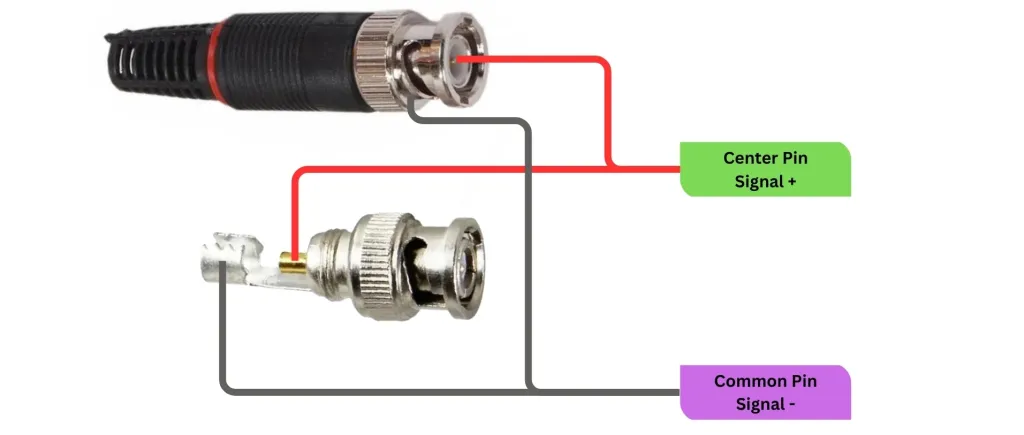
In surveillance and imaging systems, stable video transmission depends heavily on reliable connections between devices. Even when cameras and recording equipment are high quality, issues at the connector level can disrupt the entire system. Because connectors act as the bridge for signal transfer, even small faults can lead to noticeable performance problems.
Over time, environmental exposure, improper installation, or physical wear can cause connector-related issues. Identifying and resolving these problems early helps maintain system stability and prevents long-term damage.
A high-quality camera cable connector is commonly used in professional systems because it provides secure connections and stable signal transmission, but like any component, it still requires proper maintenance and troubleshooting.
Table of Contents
ToggleSignal Loss or No Video Output
One of the most common issues in camera systems is complete signal loss or missing video output. This problem often appears suddenly and can affect one or multiple cameras.
Possible causes:
- Loose or disconnected connector
- Damaged internal wiring
- Poor crimping or installation
- Faulty connector contacts
How to fix it:
- Check all connector connections and ensure they are tightly secured
- Re-crimp or reinstall the connector if needed
- Replace damaged connectors immediately
- Test the camera with a different cable to isolate the issue
A secure physical connection is essential for restoring video transmission.
Flickering or Intermittent Video
Intermittent video or flickering images are often caused by unstable connections or external interference affecting the connector.
Common reasons:
- Loose connector fittings
- Corroded contact points
- Vibration or movement in installation areas
- Poor shielding or grounding
Troubleshooting steps:
- Tighten all connector connections
- Clean contact points to remove corrosion or dust
- Inspect cable routing for excessive movement
- Ensure proper grounding in the system
Stable connections usually eliminate flickering issues.
Poor Image Quality or Signal Distortion
Blurry images, color distortion, or noise in video feeds can indicate connector-related problems affecting signal integrity.
Possible causes:
- Low-quality connectors
- Improper impedance matching
- Damaged shielding
- Partial connection failure
Fixes:
- Replace low-quality connectors with reliable ones
- Ensure correct connector type is used for the system
- Check shielding condition and repair or replace if damaged
- Verify proper installation alignment
Improving connector quality often restores clear image output.
Corrosion and Oxidation Issues
In outdoor or humid environments, corrosion is a frequent problem that affects connector performance over time.
Signs of corrosion:
- Rust on metal parts
- Weak or unstable signal
- Increased noise in video feed
- Complete signal failure in severe cases
How to resolve it:
- Clean connectors using appropriate contact cleaner
- Replace heavily corroded connectors
- Use waterproof or sealed connectors for outdoor systems
- Improve environmental protection around connection points
Preventing moisture exposure is key to long-term stability.
Loose or Poorly Fitted Connectors
Loose connections are a simple but common issue that can cause major system instability.
Symptoms include:
- Intermittent video loss
- Signal drops during movement
- Unstable camera performance
Solutions:
- Reinstall connectors with proper crimping tools
- Ensure connectors are fully locked or tightened
- Replace worn locking components
- Avoid excessive cable tension near connectors
A firm connection ensures continuous video transmission.
Electrical Interference Problems
External electromagnetic interference can affect video signals if connectors are not properly shielded or installed.
Causes include:
- Nearby power cables
- Electrical machinery
- Poor grounding
- Low-quality connectors
Fixes:
- Use well-shielded connectors
- Keep cables away from high-voltage lines
- Improve system grounding
- Replace connectors with better interference resistance
Proper shielding reduces signal noise significantly.
Physical Damage to Connectors
Connectors can become damaged due to handling, installation stress, or environmental impact.
Signs of damage:
- Cracked housing
- Bent pins or contacts
- Broken locking mechanism
- Loose internal structure
How to fix it:
- Replace damaged connectors immediately
- Avoid bending cables near connection points
- Use protective housing in high-risk areas
- Handle connectors carefully during maintenance
Physical integrity is essential for reliable performance.
Improper Installation Issues
Many connector problems originate from incorrect installation practices rather than product defects.
Common installation mistakes:
- Incorrect stripping of cable ends
- Poor crimping technique
- Using incompatible connectors
- Skipping strain relief measures
Solutions:
- Reinstall connectors using proper tools
- Follow correct installation procedures
- Ensure compatibility with cable type
- Add strain relief to reduce stress
Correct installation significantly improves long-term reliability.
Conclusion
Camera cable connector issues can significantly impact the performance of surveillance and imaging systems, but most problems can be identified and resolved with proper troubleshooting. Common issues such as signal loss, flickering video, corrosion, and poor installation are often preventable with careful maintenance and correct setup practices.
By ensuring secure installation, using high-quality components, and performing regular inspections, users can maintain stable video transmission and improve overall system reliability. A well-maintained connector system is essential for consistent and dependable camera performance.


More Stories
Wudu Basin Installation: Important Measurements and Plumbing Considerations
Enjoy Smooth, Creamy Coffee Creations with an Efficient Electric Milk Frother
China B87 Air Pick: Specifications, Heavy-Duty Applications, and Performance Advantages