

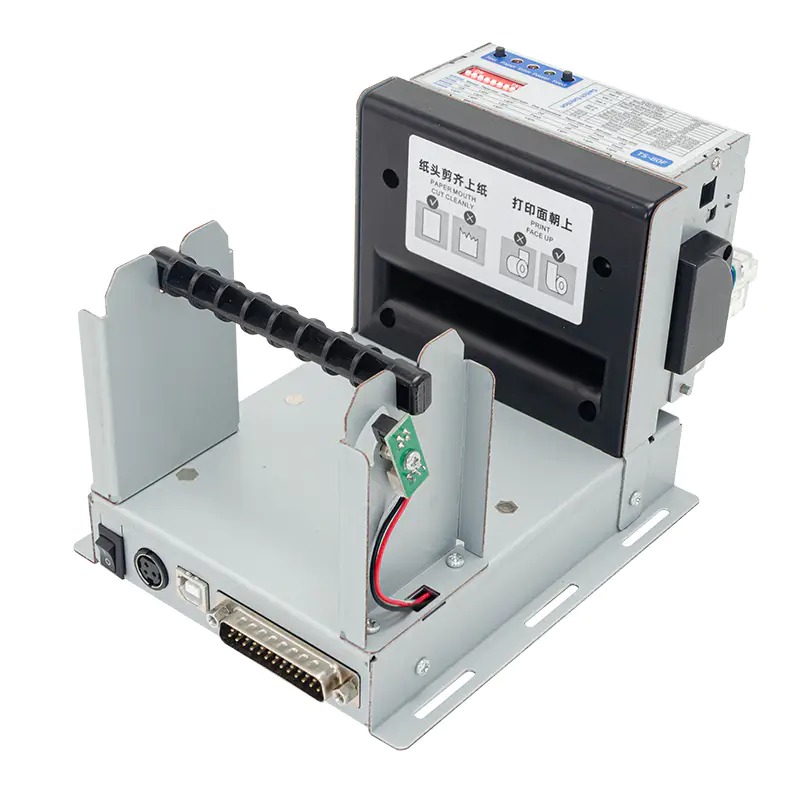
Limited installation space can make printer selection challenging, particularly when printing needs to be incorporated into industrial equipment, control systems, kiosks, or automated machinery. A suitable printing mechanism must provide the required output while fitting comfortably within the available enclosure.
A Panel Printer is designed for applications where printing needs to be integrated directly into equipment. Its compact form can help manufacturers add printing functionality without allocating the space normally required for a standalone desktop printer.
Why Space Matters in Printer Selection
In compact equipment, every component has to fit within a carefully planned layout. A printer that occupies too much space can interfere with other electronics, controls, wiring, or ventilation.
The physical dimensions of the printer are therefore only one consideration. Engineers also need to account for paper storage, cable connections, access to the print mechanism, and the space required for routine maintenance.
Assess the Available Installation Area
Before selecting a printer, measure the available space inside the equipment or control panel. Consider the height, width, and depth of the intended installation area.
It is also important to identify the position of the paper outlet. Operators need enough clearance to collect printed material and replace the paper roll without removing other equipment.
A useful assessment should include:
- Mounting dimensions
- Available depth behind the panel
- Paper roll clearance
- Cable and connector space
- Ventilation requirements
- Access for maintenance
Consider the Paper Format
Paper size can have a significant effect on the overall design. Compact printers often use rolls because they can provide continuous media without requiring a large paper tray.
A narrow paper format may be suitable for short readings, status information, receipts, or event records. Wider media may be preferable when the application requires longer lines or more detailed information.
The roll diameter should also be considered because a larger roll may reduce the frequency of paper replacement while requiring more internal space.
Choose an Appropriate Printing Technology
For space-constrained equipment, direct thermal printing can be a practical option. It creates an image using heat-sensitive paper, eliminating the need for conventional ink cartridges.
This can simplify the printer mechanism and reduce the number of consumable components that need to be accommodated within the equipment.
However, thermal media has environmental limitations. If printed records must remain readable for long periods, the application should be evaluated carefully for exposure to heat, light, moisture, and other factors.
Check Interface Requirements
A compact physical design is not enough if the printer cannot communicate effectively with the host system. Before choosing a model, determine how it will receive print data from the equipment.
Depending on the application, communication may involve USB, serial connections, or other interfaces. The printer’s communication method should be compatible with the controller, computer, or automation hardware already used in the system.
Evaluate Power Requirements
Power requirements should be checked during the early design stage. The available power supply must meet the printer’s voltage and current requirements without exceeding the capacity of the equipment’s electrical system.
Engineers should also consider how the printer’s power consumption fits into the overall equipment design, particularly in compact systems with multiple electronic components.
Plan for Paper Replacement
A printer can fit physically inside an enclosure and still be impractical if operators cannot easily replace the paper. Paper-loading access should therefore be included in the equipment layout from the beginning.
If the equipment is intended for continuous operation, consider how often the paper will need to be replaced and whether the roll capacity is sufficient for the expected workload.
Consider the Operating Environment
Space-constrained applications are not always located in controlled indoor environments. Industrial equipment may be exposed to vibration, dust, temperature fluctuations, or moisture.
Review the printer’s operating specifications and compare them with the actual environment. Installing a printer in an unsuitable location can reduce reliability even when its dimensions and interface are otherwise appropriate.
Balance Size With Functionality
The smallest available printer is not automatically the best choice. Reducing the physical footprint may limit paper capacity, print width, connectivity, or other functions that the application requires.
Instead, identify the essential requirements first and then select a compact printer that meets them. This approach avoids choosing a model that fits the enclosure but cannot deliver the required performance.
Think About Maintenance From the Start
Maintenance access is particularly important when a printer is installed inside a compact machine. Technicians should be able to inspect the mechanism, clear minor paper problems, and replace consumables without dismantling unrelated equipment.
A well-planned installation can reduce service time and make routine maintenance safer and more convenient.
Common Mistakes to Avoid
Several issues can complicate an otherwise suitable installation:
- Measuring only the printer body and ignoring connectors or cables
- Choosing a paper roll that is too large for the enclosure
- Blocking the paper outlet with other components
- Selecting a communication interface that is incompatible with the host system
- Ignoring environmental operating conditions
- Providing insufficient access for paper replacement
Addressing these factors during the design stage can prevent costly modifications later.
Conclusion
Choosing a printer for a space-constrained application requires more than finding a small device. The printer must fit the physical enclosure while providing compatible paper handling, connectivity, power requirements, environmental performance, and convenient maintenance access.
A compact integrated printer can be an effective solution for equipment where printing is required but space is limited. By evaluating the complete installation rather than focusing solely on dimensions, designers can create a practical printing system that works reliably within the available equipment space.
About Post Author




More Stories
How to Choose a Website Management Company for Your Business
AMPIN Energy Secures $195 Million Green Loan for 100 MW Solar-Wind-BESS Project
Key Features to Look for in an AI Shopping Assistant