

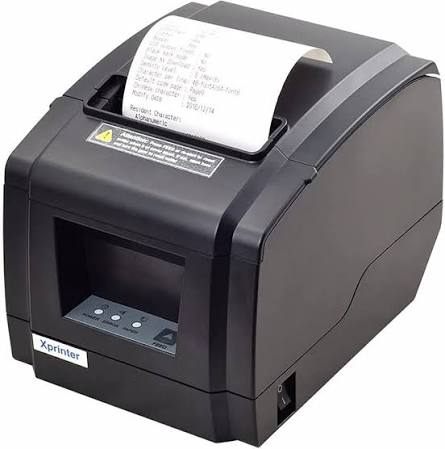
Efficient transaction processing is essential for businesses that handle regular customer payments. Retail stores, supermarkets, restaurants, and service centers need reliable equipment to complete purchases, generate payment records, and maintain organized operations. Even small delays at the checkout counter can affect customer satisfaction, particularly during busy business hours.
An Xprinter Receipt Printer can support these processes by producing transaction records through compatible point-of-sale (POS) systems. With suitable printing speed, connectivity, and software integration, receipt printers help businesses complete checkout procedures more efficiently while providing customers with clear and accurate purchase information.
1. Faster Receipt Generation at Checkout
One of the main ways receipt printers improve transaction speed is by reducing the time required to produce printed records. Once a payment is processed through the POS system, the printer receives the transaction information and generates the corresponding receipt.
Thermal receipt printers are particularly useful in busy environments because they generally produce documents quickly and operate quietly. This helps employees complete the final stage of a transaction without unnecessary waiting.
For supermarkets, convenience stores, and restaurants, faster receipt generation can contribute to smoother customer movement during peak periods.
2. Automated Printing Reduces Manual Work
Manual preparation of transaction records can consume employee time and increase the possibility of mistakes. POS-integrated receipt printers automate the printing process by receiving information directly from billing software.
After a transaction is completed, the system can automatically print details such as:
- Product names and quantities.
- Individual prices and total amounts.
- Taxes, discounts, and additional charges.
- Payment methods and transaction references.
- Purchase dates and other relevant information.
This automated process reduces repetitive tasks and allows employees to focus more attention on customer service and other responsibilities.
3. Improved Accuracy of Transaction Details
Accurate receipts are important for both customers and businesses. Incorrect prices, missing items, or unclear totals can create confusion and lead to customer complaints.
When a receipt printer is connected to properly configured POS software, it reproduces the transaction information recorded by the system. This reduces the need for employees to manually write or calculate receipt details.
However, printing accuracy also depends on correct product information, tax settings, pricing rules, and POS configuration. Businesses should maintain accurate software records to ensure that printed documents reflect the actual transaction.
4. Clear Receipts Support Better Customer Verification
Readable receipts help customers confirm what they purchased and how much they paid. Clear text, properly aligned information, and legible totals make it easier to review transaction details.
Some compatible receipt printers can also print barcodes and QR codes. These features may support loyalty programs, digital coupon systems, product verification, or links to electronic receipts, depending on the business software.
Good print quality is particularly important when customers need receipts for returns, exchanges, reimbursements, or warranty-related inquiries.
5. Reliable Connectivity Improves POS Communication
A receipt printer must communicate consistently with the POS terminal to process printing requests. Connectivity problems can interrupt checkout operations and create delays.
Depending on the model, available interfaces may include:
- USB: Provides a direct connection to compatible computers and POS terminals.
- Ethernet: Supports network-based installations.
- Bluetooth: Allows communication with compatible mobile devices.
- Wi-Fi: Provides wireless network connectivity on supported models.
- Serial: Works with certain traditional POS configurations.
Choosing the correct interface helps reduce communication problems and allows the printer to operate effectively within the existing business setup.
6. Consistent Performance During Busy Hours
Businesses often experience changes in transaction volume throughout the day. Restaurants may become busy during lunch and dinner, while retail stores may process more purchases during weekends and seasonal promotions.
A printer selected according to the expected workload can help maintain consistent checkout operations. Businesses should review printing speed, recommended operating conditions, and other manufacturer specifications before choosing a model.
For larger operations, using appropriately configured printers at multiple checkout stations can also help distribute transaction activity.
7. Better Organization Through Standardized Receipts
Standardized receipts improve the way businesses document transactions. When every receipt follows a consistent format, employees and customers can locate important information more easily.
A typical receipt may contain the business name, transaction number, itemized purchases, taxes, discounts, payment details, and final amount.
Consistent formatting is useful for accounting departments, customer support teams, and store managers who regularly review transaction records.
8. Support for Different Business Applications
Receipt printers can improve transaction workflows across several industries.
Retail Stores and Supermarkets
Retail businesses use POS-connected printers to generate itemized purchase receipts. Faster printing helps employees complete payments and move customers through checkout counters more efficiently.
Restaurants and Cafés
Restaurants use receipt printers for customer bills and, in suitable configurations, kitchen order tickets. Automated printing can help communicate order information between cashiers and kitchen staff.
Hotels and Hospitality Businesses
Hotels may use receipt printers at reception desks to provide payment confirmations, service summaries, and transaction records.
Pharmacies and Service Centers
Pharmacies, repair shops, and other service businesses can use receipt printers to document purchases and service charges. Specialized labels and larger documents may require separate printing equipment.
9. Maintenance Helps Preserve Printing Accuracy
Even a suitable receipt printer can experience problems if it is not maintained properly. Dust, paper residue, worn components, and incorrect paper installation may affect print clarity or feeding performance.
Businesses should clean the print head and paper path according to the manufacturer’s instructions. Using compatible paper rolls and checking connections regularly can also help prevent common issues.
Employees should be trained to recognize faded printing, paper-feed problems, and error indicators so that minor issues can be addressed before they interrupt service.
10. Choosing the Right Printer for Better Results
The benefits of receipt printing depend on selecting equipment that matches the business’s POS requirements. Before purchasing, consider printing technology, speed, supported paper width, connectivity, driver availability, and expected daily transaction volume.
A small shop may prioritize simple installation and compact design, while a supermarket may require faster printing and network connectivity. Restaurants may need additional flexibility for printing customer bills and kitchen tickets.
Testing compatibility with the existing POS application can help prevent integration difficulties and ensure reliable operation.
Conclusion
Xprinter receipt printers can support faster and more accurate transaction processing by automating receipt generation, producing readable purchase records, and communicating with compatible POS systems. Their role extends beyond printing paper documents because they help connect payment processing with customer documentation and daily business organization.
By selecting a model with suitable performance, connectivity, and software compatibility, businesses can improve checkout efficiency and maintain more consistent transaction records. Regular maintenance and accurate POS configuration further contribute to dependable printing operations.
About Post Author



More Stories
Important Questions to Ask Before Choosing a Marine Bearing Supplier
CHZ Lighting Solutions: Improving Safety, Visibility, and Energy Efficiency
Private Label Notebooks: How to Create Customized Stationery for Your Brand