

Point of Sale (POS) systems are essential tools for businesses seeking to streamline transactions, manage inventory, and enhance customer experiences. With the growing variety of POS solutions, business owners often face the decision between a desktop POS machine and a mobile POS system. Both options have unique features, advantages, and limitations. Understanding their differences is crucial to selecting the system that best aligns with operational needs and long-term goals.
Understanding Desktop POS Machines
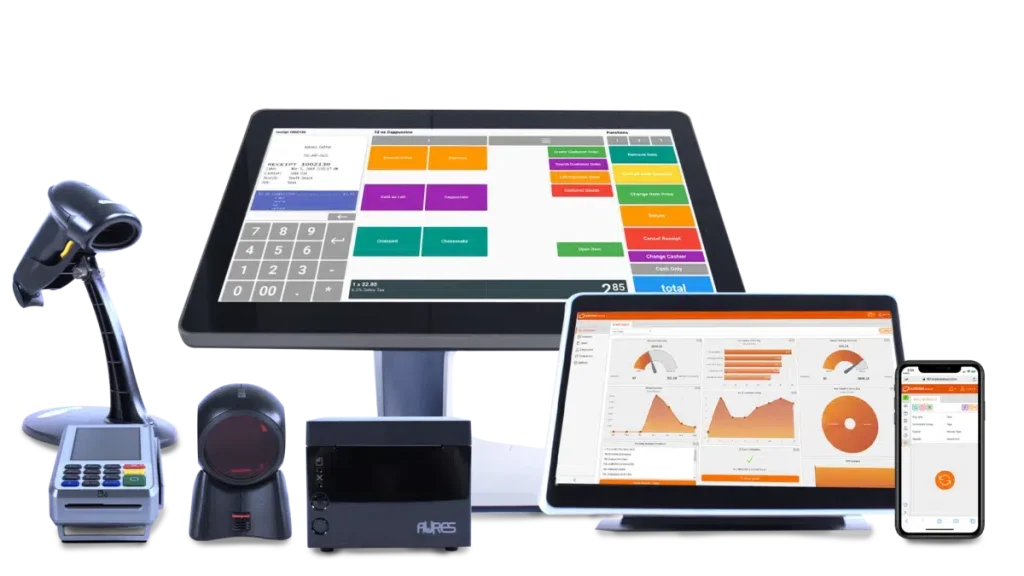
A desktop POS machine is a stationary, all-in-one system designed for fixed checkout counters. It typically includes a touchscreen or monitor, a central processing unit (CPU), a cash drawer, barcode scanners, receipt printers, and secure payment terminals. These machines are integrated with POS software that manages sales, inventory, and reporting in real time. A reliable Desktop POS Machine provides a robust platform for businesses with high transaction volumes, multiple product lines, and complex operational requirements.
Desktop POS machines are widely used in retail stores, restaurants, supermarkets, and other establishments that require a permanent checkout station. They offer powerful hardware, advanced security features, and comprehensive functionality that supports multi-register setups and multi-location management.
Understanding Mobile POS Systems
Mobile POS systems, also known as mPOS, are portable solutions that use smartphones, tablets, or specialized handheld devices to process transactions. Mobile POS systems are ideal for businesses that require flexibility, such as pop-up stores, food trucks, market stalls, or table-side ordering in restaurants. These systems often rely on cloud-based software to manage inventory, track sales, and synchronize data with other business systems.
Mobile POS systems offer the advantage of mobility, enabling employees to process payments anywhere within the store or on-site at customer locations. They are typically lightweight, easy to set up, and cost-effective, making them attractive to small or temporary businesses.
Key Differences Between Desktop and Mobile POS Systems
Hardware and Performance
Desktop POS machines are built for durability and high-volume usage. Their hardware components, such as powerful CPUs, large touchscreens, and multiple peripheral connections, support continuous operation and extensive transaction processing. Mobile POS systems, on the other hand, rely on portable devices with smaller screens and limited processing capabilities. While mPOS systems are convenient, they may not handle high transaction volumes as efficiently as desktop POS machines.
Functionality
Desktop POS machines offer extensive functionality, including detailed reporting, multi-register support, advanced inventory management, customer relationship management, and integration with third-party software. Mobile POS systems provide essential features for processing sales, tracking inventory, and managing basic reporting but may lack the advanced capabilities of desktop systems. Businesses with complex operations or multiple product categories often benefit more from the comprehensive features of a desktop POS machine.
Security
Security is a critical factor in POS systems. Desktop POS machines typically include enhanced security features such as encrypted payment processing, secure cash drawers, user authentication, and compliance with PCI DSS standards. Mobile POS systems rely on device security and secure cloud connections, which can be effective but are more susceptible to risks associated with lost or stolen devices. Businesses handling sensitive customer and financial data may prefer the robust security of desktop POS machines.
Scalability
Desktop POS machines are highly scalable, supporting multi-register setups, multi-location operations, and additional hardware components as business needs grow. Mobile POS systems are less scalable in hardware terms but can expand software features through cloud-based solutions. Businesses anticipating significant growth or requiring centralized control over multiple locations may find desktop POS machines more suitable.
Cost Considerations
Mobile POS systems are generally more cost-effective initially, as they require minimal hardware investment. Desktop POS machines involve a higher upfront cost due to hardware requirements and installation, but they often provide long-term value through durability, advanced functionality, and efficiency in high-volume environments.
Which Option Should You Choose?
The choice between a desktop POS machine and a mobile POS system depends on the specific needs of the business:
-
Choose a desktop POS machine for businesses with high transaction volumes, multiple products, permanent checkout locations, or multi-location operations. It offers comprehensive functionality, enhanced security, and scalability for long-term growth.
-
Choose a mobile POS system for small businesses, pop-up stores, or businesses requiring flexibility and portability. It is cost-effective, easy to set up, and ideal for low to medium transaction volumes.
Conclusion
Both desktop POS machines and mobile POS systems provide valuable solutions for managing transactions and business operations. Desktop POS machines excel in durability, advanced functionality, and scalability, making them ideal for established businesses with complex needs. Mobile POS systems offer portability, flexibility, and ease of use, catering to smaller or mobile businesses. Evaluating your business requirements, transaction volume, security needs, and growth plans will help determine the best POS system to enhance efficiency, customer satisfaction, and operational success.
About Post Author




More Stories
Essential Mining Substation Equipment for Safe and Reliable Power Distribution
How TikTok Creator Tools Help Creators Analyze Performance and Increase Engagement
Wudu Basin Installation: Important Measurements and Plumbing Considerations